Transformation Value Operators
In the AS system, operators + and - are used to determine the compound transformation values (the XYZOAT values).
However note that unlike the usual addition or subtraction, the commutative law does not hold true with the transformation operation. Arithmetic expression “a + b” and “b + a” will result the same, but “pose a + pose b” will not necessarily equal “pose b + pose a”. This is because in transformation operations, the values of the axes are taken into consideration. An example of this is shown below:
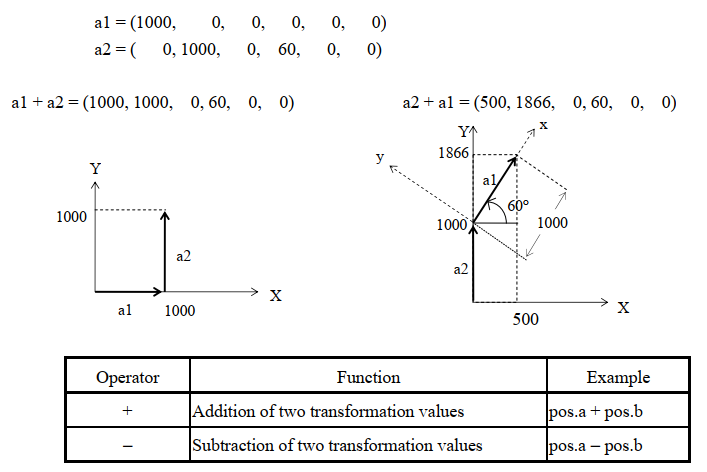
Kieran's Note: This is vitally important to understand as the difference between coordinate frames is not explicit in AS language. Moving in Base, World, or Tool coordinates is all a matter of the order that the poses are added together
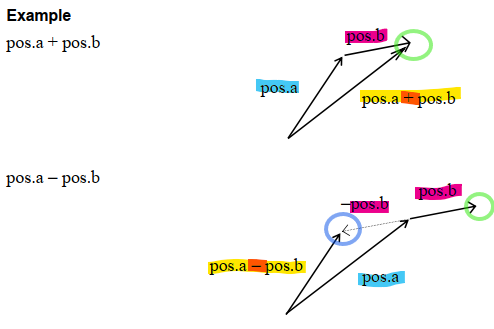
In the above examples, we can see how the order that the poses are added affects the final location.
Kieran's Note: Poses are compounded in the order that they are written in the expression, tip to tail.
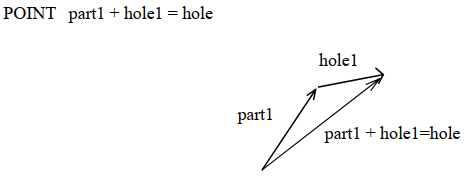
In the example below, “hole1” is to be defined relative to “part1” (defined in advance). This can be done using the compound transformation value variable part1+hole.
Move the robot to the pose to be defined “hole1” and teach that pose as “hole” using the HERE command. Using this pose (“hole”), “hole1” can be defined.
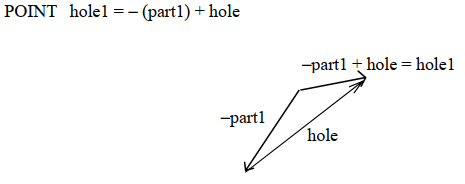
Another way to define “hole1” without using the operator “-” is by writing “hole1” in the left side of the expression in POINT command. The following command also defines “hole1”.