Jogging the robot
Follow the below steps to jog the FANUC robot:
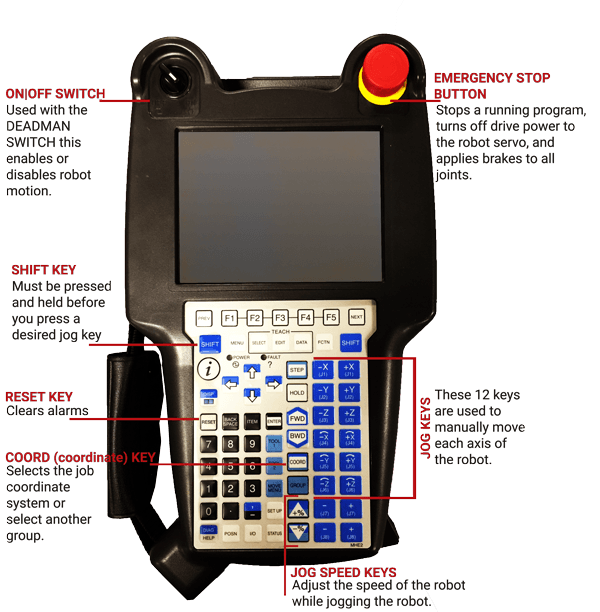
- Ensure the teach pendant and robot controller are in T1 mode (ON|OFF SWITCH).
- Hold the "deadman" 3-position switch in the middle position. There are two of these located on the back of the teach pendant. Only one of them needs to be held in the middle position.
- Press the reset button on the pendant (while holding the deadman). This will clear non-latching faults on the robot. This step needs to be done each time you release the deadman switch because it faults the robot with an E-stop condition.
- Ensure the speed of the robot is set low (<50%) to avoid sudden movements of the robot arm.
- Press the "Coord" button until the robot coordinate frame is set to WORLD.
- Press and hold the Shift button on the pendant and press one of the axis jog buttons (-X, +X, -Y, +Y, -Z, +Z, etc).
- After jogging the robot, remember to put the teach pendant and robot controller back into Repeat mode. This allows the PLC to remote start the robot.