
Inventor iLogic Scripts
What is iLogic?
iLogic is an automation engine based on the VisualBasic coding language. The files are denoted with the .iLogicVb file extension.
Once you start using it, it's hard to stop. You can find use cases for it EVERYWHERE. It is insanely powerful and incredibly versatile, letting you speed up your workflow and avoiding the tedious parts of Inventor through hotkeys, macros, and automated scripts.
In iLogic, scripts are called Rules.
How do you set it up?
Public folder consisting of already public rules is available at: G:\Robotics\05 - Software\Inventor iLogic
- Create a local folder on your computer to store your iLogic rules.
- Copy the ones you want to use from above to your newly created folder.
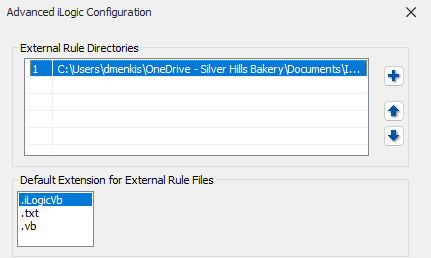
- Inside Inventor, click on tools, then click on Options > iLogic Configuration.
- Click on the little plus sign and select your folder and click ok.
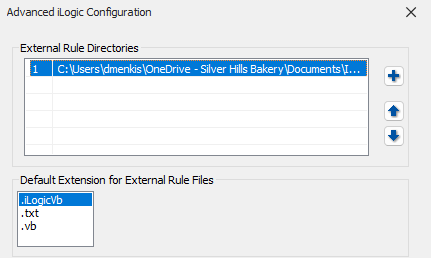
- Now if you go to Manage > iLogic > iLogic Browser, you should be able to see your folder (and rules contained within if there are any) under External Rules.
- From here, you can right click on rules to run them, bind them to custom keys by rightclicking on empty space in the top ribbon > Customize User Commands > Keyboard > Categories(Add-Ins), and then look for your command and assign a keybind.
- Alternatively, you can click on iLogic > Event Triggers, and drag your External rule to trigger on a specific event state within different types of documents.
Rule Naming Conventions
- Self Explanatory phrase that describes what it does
Example: UpdatePropertiesWithName&Date
If ThisDoc.Document.DocumentType = kDrawingDocumentObject Then
      iProperties.Value("Custom", "DR") = "DDM
    iProperties.Value("Custom", "DR DATE yyyy.mm.dd") = DateTime.Now.ToString("yyyy.MM.dd")
End If
As the name suggests, this code updates the properties of a file with your name & today's date. I have this triggered before save for all drawings which saves me from doing the very tedious task of going manually to the file properties, waiting for it to load, finding the lines, typing it in, and the clicking apply and then saving.
Writing your own scripts
For writing your own scripts, I recommend sending your idea to Gemini 3.0 or your preferred AI of choice but as of the time of writing January 15th 2026 Gemini is the best at this right now.
Some of the scripts already exist in the public folder, if you want to use these, dont make any changes to the public rules unless otherwise approved because of bugs or otherwise. Instead copy them to your local folder and then make changes.