
XMOVE
XMOVE mode pose variable TILL signal numberFunction
Moves the robot towards the specified pose in linear movement, stops motion when the specified
signal condition is set even if the pose has not been reached, and skips to the next step.
Parameter
Moves the robot towards the specified pose in linear movement, stops motion when the specified
signal condition is set even if the pose has not been reached, and skips to the next step.
/ERR (Option)
Returns an error if the signal condition is already set when the monitoring starts.
/LVL (Option)
Immediately skips to the next step if the signal condition is already set when the monitoring
starts.
Pose variable
Specifies the destination pose of the robot motion. (Can be in transformation values, compound
transformation values, joint displacement values or pose information functions.)
Signal number
Specifies the number of external input signal or internal signal
Acceptable signal numbers
| External input signal | 1001 to actual number of installed signals or 1256 (the smaller of the two). |
| Internal signal | 2001 to 2960 |
Explanation
[Explanation]
Example
//XMOVE Exampleend ofTILL function1001
usedLMOVE {* Multi line comments*}
// Use Pascal highlighter for best results when displaying AS languageskip
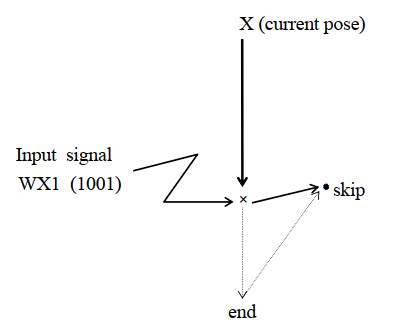
Moves from the current pose to pose “end” in linear motion. As soon as the input signal 1001 is
turned ON, the program execution skips to the next step (LMOVE skip) even if the robot has not
reached “end”.
[NOTE]
[NoteWhen monitoring the rising and trailing edge of the signal, the program branches only when
there is a change in definition]the signal status. Therefore, if the rising edge of signal is monitored and
the signal is ON at the time XMOVE is executed, the program will not be interrupted until that
signal turns OFF and then ON again.
The input signal should be stable for at least 50 msec for accurate monitoring